Dynamic Routing
Routing allows you to dynamically select different models based on request characteristics. This enables intelligent request distribution, cost optimization, and performance tuning.
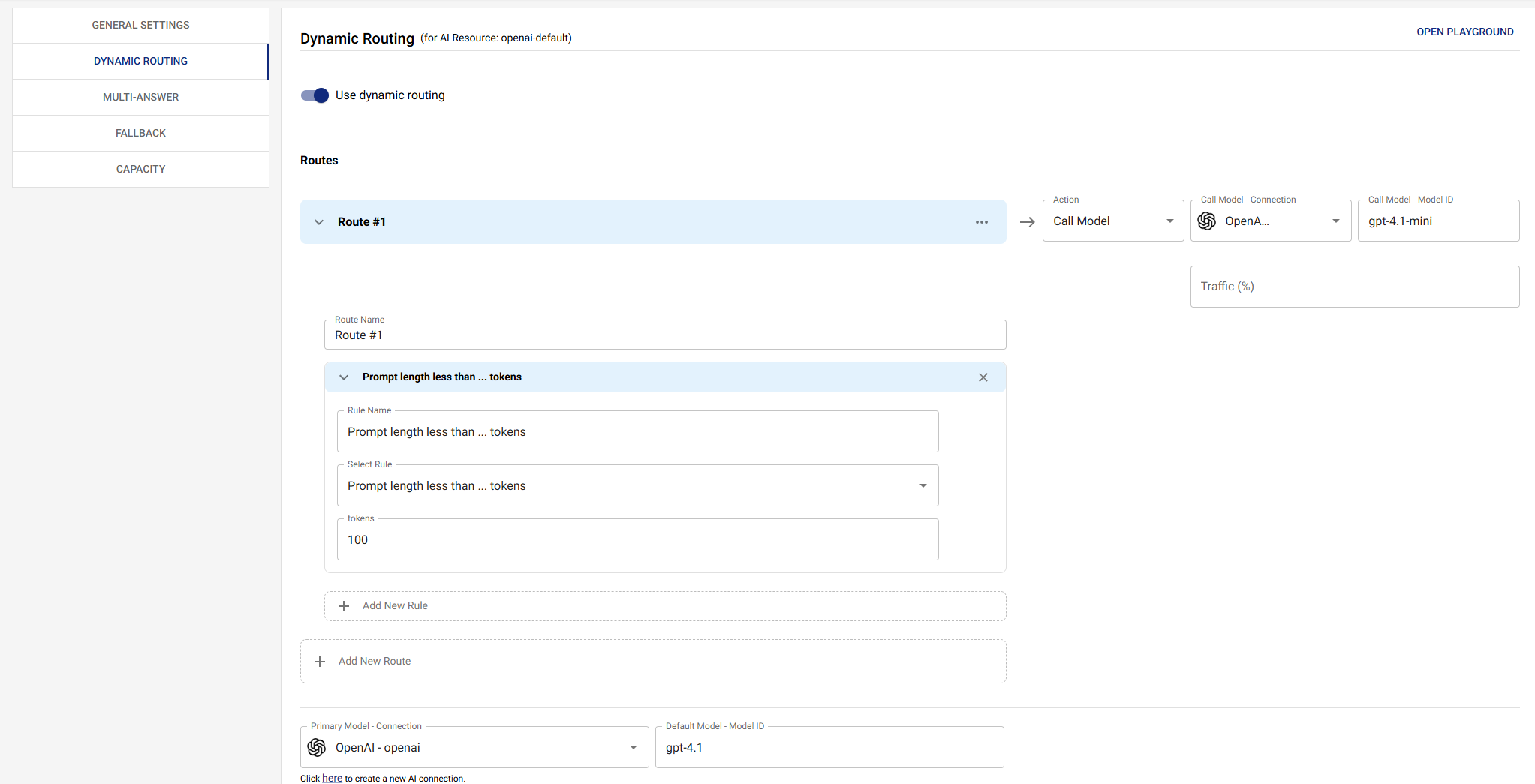
Overview
Dynamic routing evaluates conditions for each request and selects the most appropriate model based on:
- Token count: Route small requests to faster/cheaper models
- Error rates: Automatically switch providers when error rates are high
- Tool usage: Route tool-enabled requests to models that support tools
- Content analysis: Route based on message content or patterns
- Traffic splitting: A/B test models or gradually roll out new models
Basic Routing
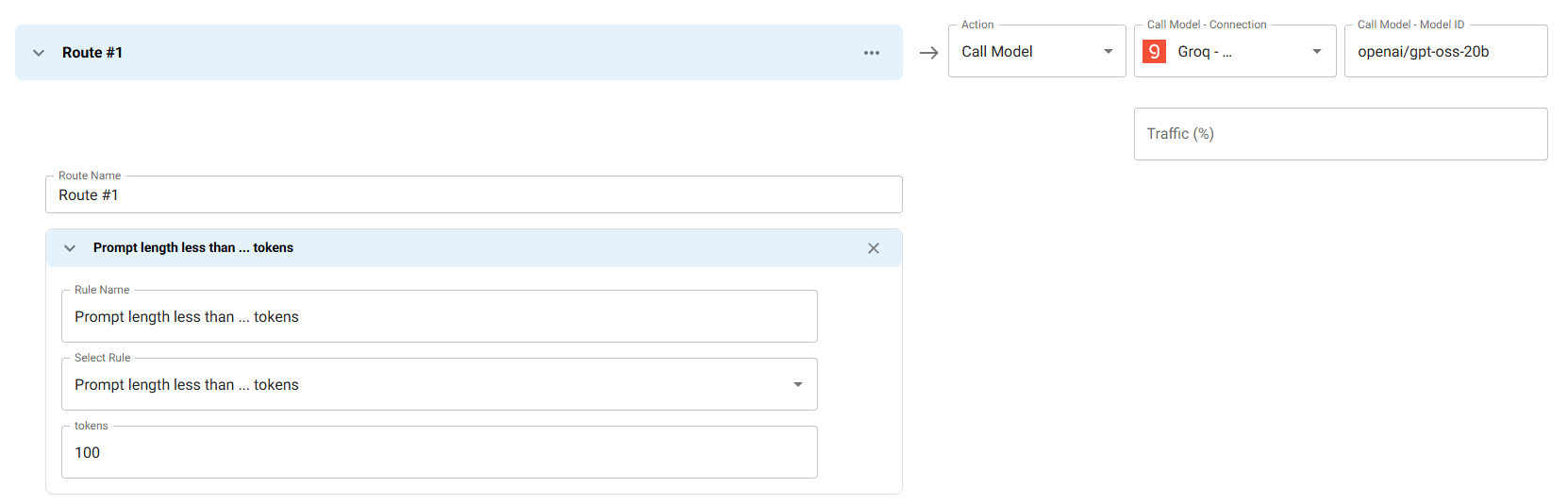
Route based on simple conditions. This example demonstrates token-based routing, where requests with fewer than 100 input tokens are routed to a faster, cost-effective model (Groq with openai/gpt-oss-20b), while larger requests use the default primary model.
Use Case: Optimize costs and latency by routing small, simple queries to faster models while reserving more powerful models for complex requests.
How it works: The routing condition evaluates tokens.input using the LESS_THAN comparator with a value of 100. When a request has fewer than 100 input tokens, it automatically routes to the specified Groq connection and model instead of the primary model.
Routing Based on Error Rate
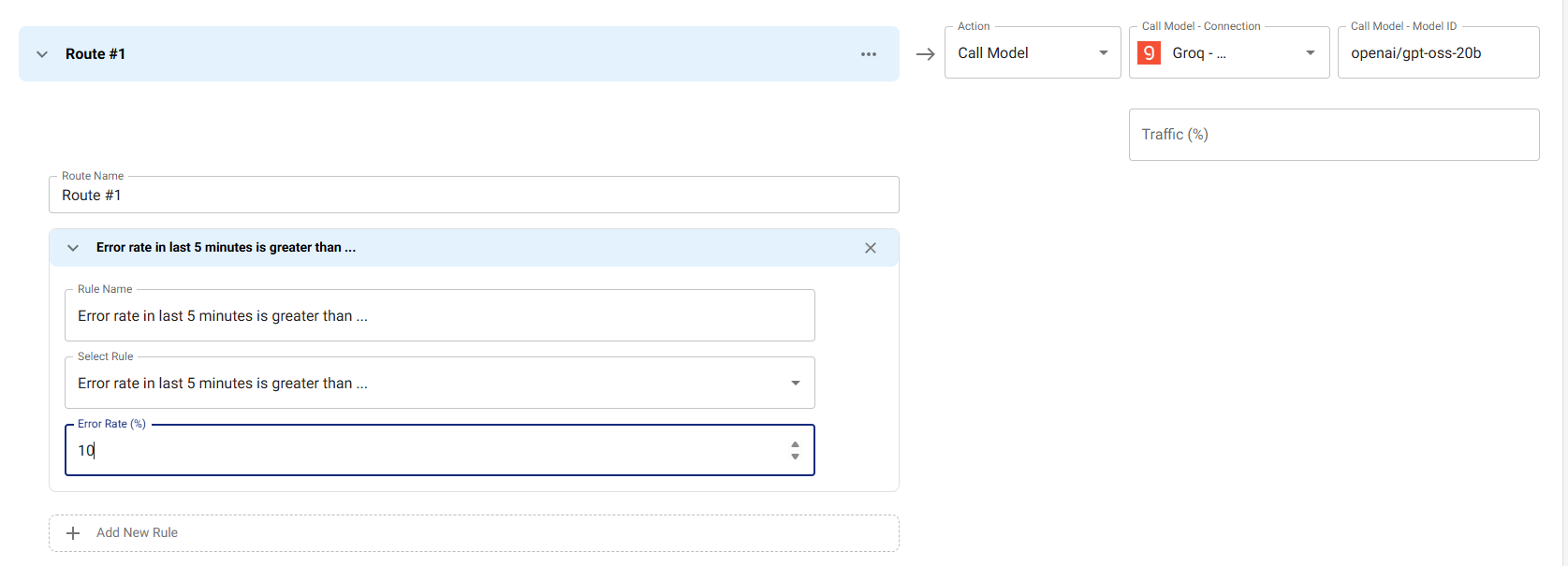
Automatically switch to a different provider when error rates exceed a threshold. This example monitors the error rate over the last 5 minutes and routes to Groq with openai/gpt-oss-20b if the error rate exceeds 10%.
Use Case: Maintain high availability by automatically failing over to a backup provider when the primary provider experiences issues. This is especially useful for production workloads where uptime is critical.
How it works: The routing condition uses errorRate(10) to calculate the error percentage over the last 5 minutes. When this percentage exceeds 10% (using the GREATER_THAN comparator), all subsequent requests are routed to the specified Groq connection and model until the error rate drops below the threshold.
Benefits:
- Automatic failover without manual intervention
- Reduces downtime during provider outages
- Helps maintain service reliability
Routing Based on Tools Usage
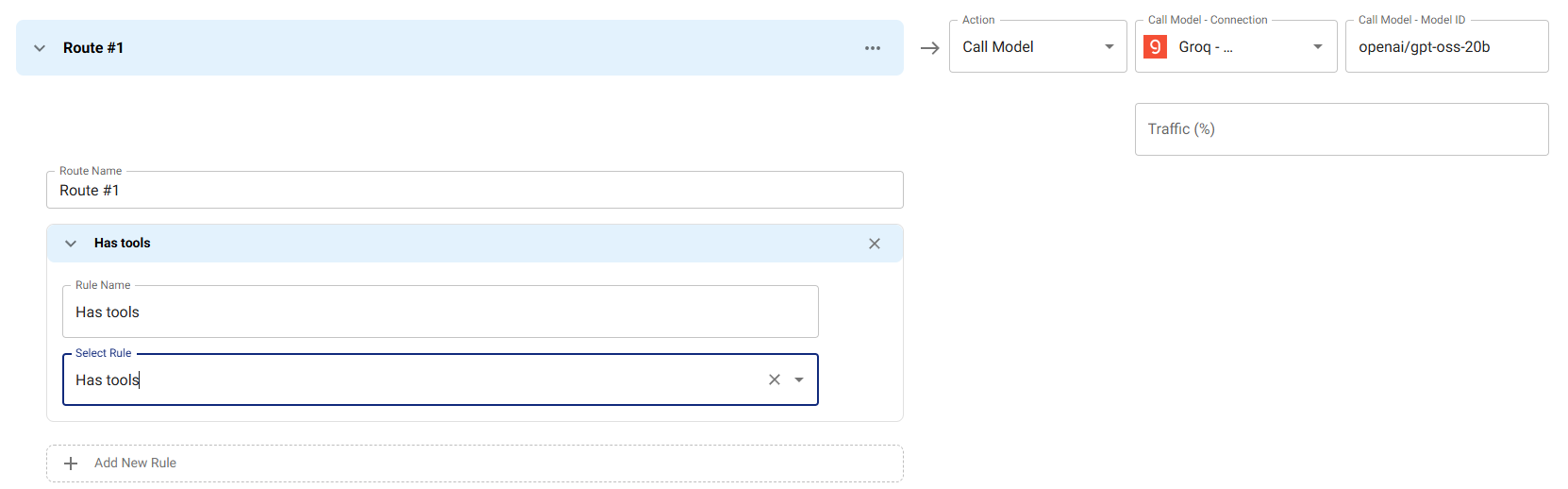
Route requests that include function calling or tool usage to models that support these features. This example routes any request with tools to Groq with openai/gpt-oss-20b, which supports tool/function calling.
Use Case: Ensure requests requiring function calling or tool usage are handled by models with robust tool support, while simpler requests can use more cost-effective models.
How it works: The routing condition checks request.toolsCount using the GREATER_THAN comparator with a value of 0. When a request includes one or more tools (toolsCount > 0), it routes to the specified Groq connection and model.
Benefits:
- Guarantees tool-enabled requests use compatible models
- Prevents tool-related errors from using incompatible models
- Optimizes costs by only using premium models when needed
Available Routing Fields and Expressions
Routing conditions evaluate against a small set of request-shaped
variables. The OpenAI-shape body is always available under request.*
regardless of which endpoint the caller used (Chat Completions,
Responses, or Anthropic Messages) — Responses and Anthropic requests
are converted to OpenAI shape before routing runs.
Token-Based Conditions
tokens.input: Number of input tokens in the request- Example: Route to Groq if input tokens < 100
Request Conditions
request.model: The resource name the caller targeted (the request'smodelfield).request.messagesCount: Number of messages in the request.request.toolsCount: Number of tools declared on the request. UseGREATER_THAN 0to check whether the request uses tools at all.request.firstMessage/request.lastMessage: First and last message objects. Read.contentfor the text body. Both areundefinedwhen the request has no messages.request.allMessagesContent: All message contents joined into a single string. SupportsCONTAINSandPATTERN. Length-based routing usesrequest.allMessagesContent.lengthwith a numeric comparator.
Format and Native-Body Conditions
Routing rules can also branch on the input format the client used and read fields the OpenAI conversion would otherwise drop:
request.format: One of"openai","responses","anthropic". Lets a single resource apply different rules depending on which endpoint was hit.request.nativeBody: The original request body, before format conversion. Use this to read provider-native fields that the OpenAI shape doesn't model — for examplerequest.nativeBody.thinking(Anthropic extended thinking),request.nativeBody.cache_control(Anthropic prompt caching),request.nativeBody.instructionsorrequest.nativeBody.reasoning(Responses-only fields).
These fields are evaluated through EJS, so they appear in advanced-
mode routing expressions like
<%= request.format === 'anthropic' && request.nativeBody.thinking %>.
Error-Rate Function
errorRate(windowMinutes)— async function returning the error-rate percentage for the resource's primary connection/model over the lastwindowMinutes. Defaults to 10 minutes when called with no argument. Supports the numeric comparators (GREATER_THAN,LESS_THAN, …).- Example: Switch providers when
errorRate(5) GREATER_THAN 10(more than 10% errors in the last 5 minutes).
- Example: Switch providers when
Available Comparators
The full set, all of which are valid on numeric and string fields where it makes sense:
- Equality:
EQUAL,NOT_EQUAL - Numeric:
GREATER_THAN,GREATER_THAN_OR_EQUAL,LESS_THAN,LESS_THAN_OR_EQUAL - String:
CONTAINS,NOT_CONTAINS,STARTS_WITH,ENDS_WITH,PATTERN(regex) - Membership:
IN,NOT_IN(against a comma-delimited list or JSON array value) - Existence:
EXISTS(truthy check)
Routing Actions
Each route declares an action. There are two:
CALL_MODEL— when the route matches, the request is dispatched to the configuredthenmodel (provider, connection, model, and optional per-modelmaxRetries/timeoutMs). This is the default action used by token-based, error-rate-based, and traffic-splitting routes.BLOCK— when the route matches, the gateway short-circuits and returns400 Bad Requestto the caller without calling any provider. Use this to enforce policy at the routing layer (for example, block requests whose prompt matches a known prompt-injection probe).
Traffic Splitting
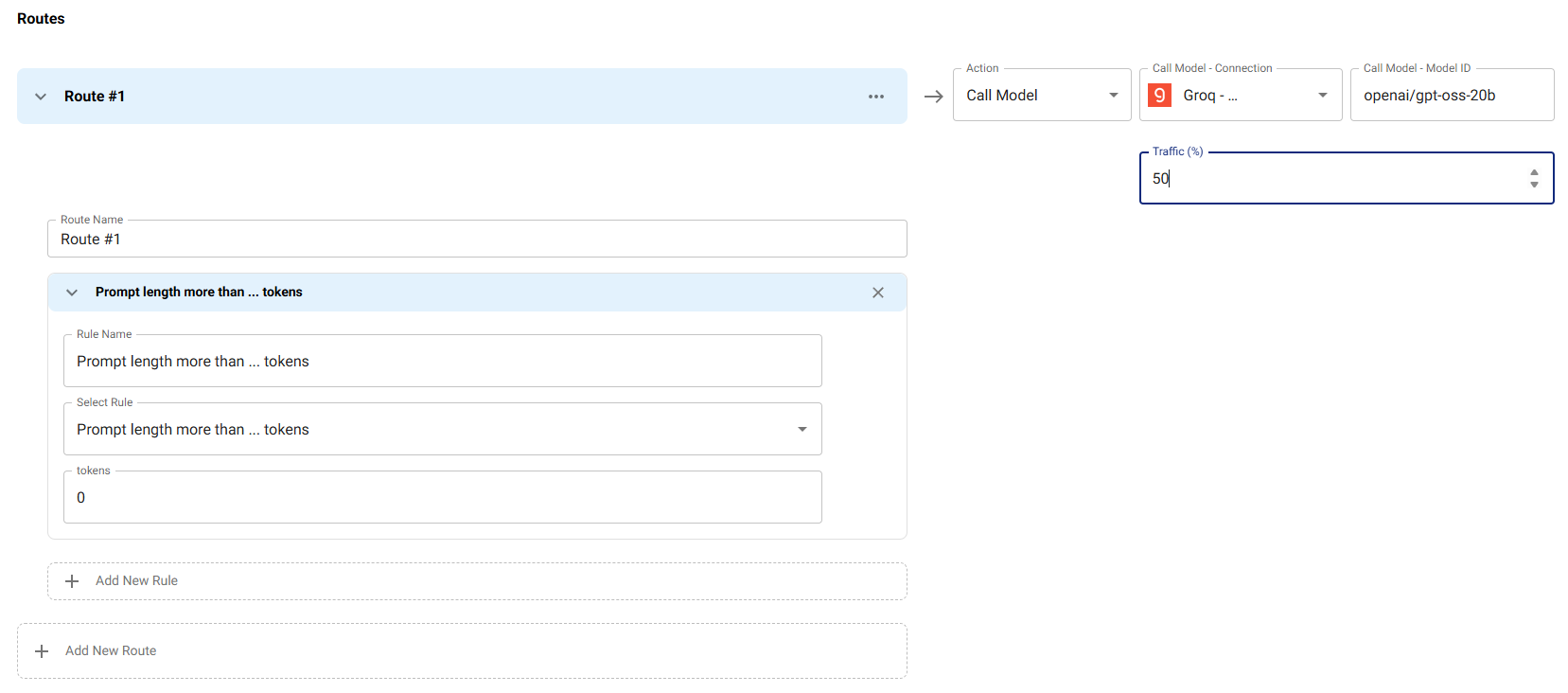
Use traffic splitting for A/B testing, gradual rollouts, or canary deployments. This example routes 50% of requests matching the condition (input tokens > 0) to Groq with openai/gpt-oss-20b, while the other 50% use the default primary model.
Use Case:
- A/B Testing: Compare performance, quality, or cost between different models
- Gradual Rollouts: Safely introduce new models by starting with a small percentage of traffic
- Canary Deployments: Test new models in production with limited exposure
How it works: The routing condition matches any requests, but the traffic field limits this route to only 50% of matching requests. The remaining 50% of matching requests continue to use the primary model. This creates a controlled split where you can monitor and compare both models' performance.
Best Practices:
- Start with a low percentage (10-20%) when testing new models
- Monitor error rates, latency, and quality metrics for both routes
- Gradually increase the percentage as confidence grows
- Use audit logs to track which route each request took
The traffic field is set on the route's then model config and
specifies the percentage (0-100) of matching requests that should use
this route. Routes are evaluated in declared order; on a match without
traffic, the first matching route wins. With traffic, the gateway
rolls dice — if the dice roll fails, evaluation continues to the next
route, so a downstream route can still pick up the remaining
percentage. If no route matches, the resource's primary model is used.
Best Practices
1. Start with Simple Conditions
Begin with basic routing:
- Token-based routing (small vs. large requests)
- Tool-based routing (requests with/without tools)
- Error rate-based routing (fallback when errors are high)
2. Test Routing Conditions
Before deploying:
- Test routing conditions with sample requests
- Verify routing logic works as expected
- Monitor routing decisions in audit logs
3. Use Traffic Splitting for Rollouts
Gradually roll out new models:
- Start with low traffic percentage (10-20%)
- Monitor performance and errors
- Gradually increase traffic percentage
- Fully switch when confident
4. Monitor Routing Decisions
Regularly review:
- Which routes are being used most
- Routing decision patterns
- Performance differences between routes
- Error rates per route
Troubleshooting
Routing Not Working
- Check Routing Enabled: Ensure routing is enabled in the resource configuration
- Verify Conditions: Check routing conditions are correct and match your use case
- Review Logs: Check audit logs for routing decisions to see which conditions are being evaluated
- Test Conditions: Test routing conditions with sample requests to verify they work as expected
Wrong Model Selected
- Check Condition Order: Routing conditions are evaluated in order - ensure conditions are ordered correctly
- Verify Expressions: Check that expressions match the request characteristics
- Review Traffic Splitting: If using traffic splitting, verify the percentage is set correctly
- Check Connection Availability: Ensure the selected connection and model are available and configured correctly
Next Steps
- Fallback - Configure automatic fallback
- Capacity - Set resource-level capacity limits
- AI Resources Overview - Return to AI Resources overview