Automatic Fallback
Fallback models are automatically used if the primary model fails. This ensures high availability and resilience to provider outages.
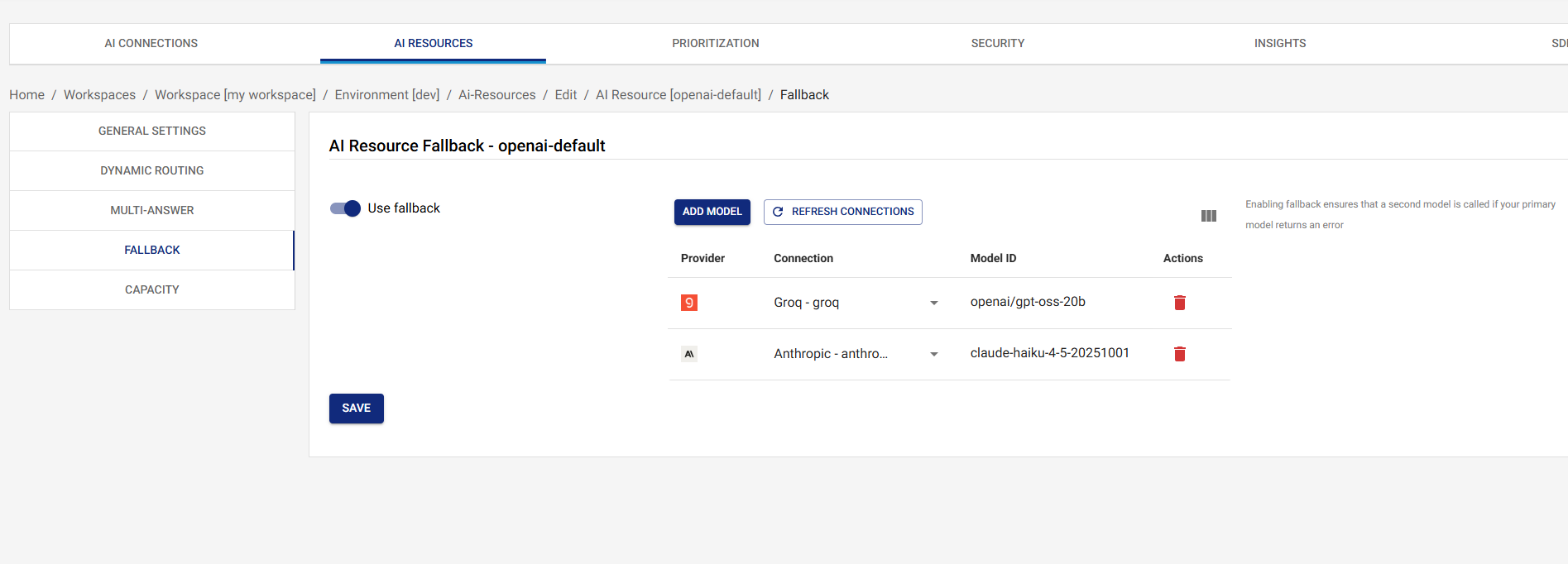
Overview
Automatic fallback provides:
- High Availability: Automatic failover when primary models fail
- Resilience: Protection against provider outages and errors
- Cost Optimization: Use cheaper fallback models when appropriate
- Zero Downtime: Seamless switching between providers
Configuring Fallback
- Navigate to AI Resources in the UI
- Click on the resource you want to configure
- Click on the Fallback tab
- Add one or more fallback models (provider, connection, model,
and optional per-model
maxRetries/timeoutMs) - Click on the Save button
Each fallback model can carry its own maxRetries and timeoutMs
so different legs of the chain can be tuned independently — a
chatty rate-limited provider may benefit from a few SDK-internal
retries before the gateway falls through, while a deterministic
upstream may prefer 0 to fail fast. See
Per-Model Tuning.
Fallback Model Order
Fallback models are tried in the order they are configured:
- Primary (or routed) model fails
- Try first fallback model
- If that fails, try second fallback model
- Continue until a model succeeds or all fail
The chain is linear — there's no skipping or reordering at runtime. If a leg succeeds, every later leg is left untouched.
When Fallback Triggers
The gateway falls through to the next leg whenever the current leg throws — there is no allow-list of "retryable" status codes. In practice this includes:
- Provider errors: 4xx (including 429 rate-limit) and 5xx responses from the upstream
- Timeout errors: per-request
vmx.timeoutMsand per-modeltimeoutMsdeadlines - Network failures: connection refused, DNS failures, TLS errors, etc.
- Invalid responses: malformed JSON or shape the provider driver can't parse
- Capacity-gate denials on the leg's model/connection: when the resource or connection has hit its TPM / RPM limit, the gateway treats this like any other error and tries the next leg. If the next leg shares the same exhausted connection it will also be denied, so configure your fallback chain across different providers / connections to get real failover.
Each failed leg records a fallback audit event with the failed
model, the upstream status code, and the error message — visible
in the audit log and on the response's
x-vmx-event-{i}-fallback-* headers.
Fallback Chain Example
Consider a resource with the following configuration:
{
  "model": {
    "provider": "openai",
    "connectionId": "openai-connection-id",
    "model": "gpt-4o"
  },
  "fallbackModels": [
    {
      "provider": "bedrock",
      "connectionId": "bedrock-connection-id",
      "model": "anthropic.claude-3-5-sonnet-20241022-v2:0",
      "timeoutMs": 5000
    },
    {
      "provider": "groq",
      "connectionId": "groq-connection-id",
      "model": "llama-3.1-70b-versatile",
      "maxRetries": 2
    }
  ]
}
Request Flow:
- Request comes in → Try OpenAI GPT-4o
- If OpenAI fails → Try Bedrock Claude
- If Bedrock fails → Try Groq Llama
- If all fail → Return error to client
Best Practices
1. Use Multiple Fallback Models
Always configure multiple fallback models:
- Different providers (avoid single points of failure)
- Different cost profiles (balance cost and availability)
- Different performance characteristics (optimize for different scenarios)
2. Order Fallback Models Strategically
Order fallback models by:
- Reliability: Most reliable models first
- Cost: Cheaper models for non-critical fallbacks
- Performance: Faster models for time-sensitive requests
- Provider Diversity: Use different providers to avoid cascading failures
3. Test Fallback Chains
Before deploying:
- Test fallback chains with simulated failures
- Verify fallback models are accessible and configured correctly
- Monitor fallback usage in production
4. Monitor Fallback Usage
Regularly review:
- How often fallback is triggered
- Which fallback models are used most
- Error patterns that trigger fallback
- Performance of fallback models vs. primary
Fallback and Routing
Fallback works seamlessly with routing:
- Routing selects a model based on conditions
- If the routed model fails, fallback chain is triggered
- Fallback models are tried in order until one succeeds
Example:
{
  "routing": {
    "enabled": true,
    "conditions": [
      {
        "description": "Use Groq for small requests",
        "expression": "tokens.input",
        "comparator": "LESS_THAN",
        "value": {
          "type": "NUMBER",
          "value": 100
        },
        "then": {
          "provider": "groq",
          "connectionId": "groq-connection-id",
          "model": "llama-3.1-70b-versatile"
        }
      }
    ]
  },
  "fallbackModels": [
    {
      "provider": "openai",
      "connectionId": "openai-connection-id",
      "model": "gpt-4o-mini"
    }
  ]
}
Request Flow:
- Small request (< 100 tokens) → Route to Groq
- If Groq fails → Fallback to OpenAI GPT-4o-mini
- If OpenAI fails → Return error
Troubleshooting
Fallback Not Triggering
- Verify Fallback Models: Check fallback models are configured correctly on the Fallback tab and were saved.
- Check the audit log: A failed leg always emits a
fallbackaudit event. If the event is missing, the primary call is probably succeeding (or the request never reached the gateway). - Check the response headers:
x-vmx-event-countplusx-vmx-event-{i}-fallback-*headers reflect every leg the gateway tried. - Check Logs: Review the gateway logs for the failed leg's stack trace and the upstream provider's error message.
Fallback Models Failing
- Check Connection Status: Verify fallback connections are active and configured correctly
- Verify Model Availability: Ensure fallback models are available from the provider
- Review Error Messages: Check error messages to understand why fallback models are failing
- Test Fallback Models: Test fallback models independently to verify they work
All Models Failing
If all models (primary + fallbacks) are failing:
- Check Provider Status: Verify provider services are operational
- Review Network Connectivity: Check network connectivity to providers
- Verify Credentials: Ensure all connections have valid credentials
- Check Capacity: Verify connections have available capacity
- Review Error Patterns: Look for common error patterns across providers
Next Steps
- Dynamic Routing - Learn about dynamic routing rules
- Capacity - Set resource-level capacity limits
- AI Resources Overview - Return to AI Resources overview