Resource-Level Capacity
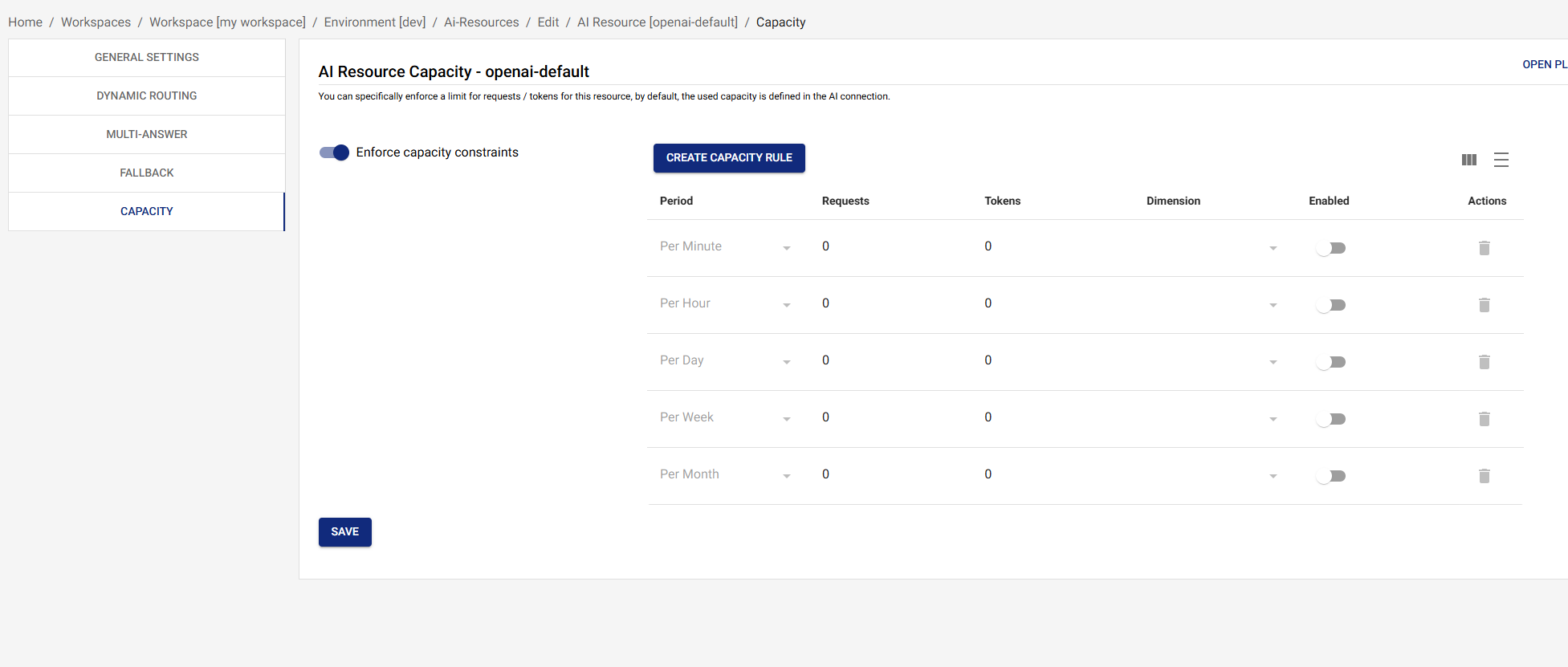
Define capacity limits specific to a resource. This allows you to control usage per resource independently and implement tiered access levels.
Overview
Resource-level capacity provides:
- Independent Limits: Set capacity limits per resource, independent of connection limits
- Cost Control: Control spending by limiting usage per resource
- Tiered Access: Implement different capacity tiers for different resources
- Fair Usage: Ensure fair distribution of capacity across resources
Configuring Resource Capacity
Define capacity limits for a resource:
{
  "capacity": [
    {
      "period": "minute",
      "requests": 50,
      "tokens": 50000,
      "enabled": true
    },
    {
      "period": "hour",
      "requests": 2000,
      "tokens": 2000000,
      "enabled": true
    },
    {
      "period": "day",
      "requests": 50000,
      "tokens": 50000000,
      "enabled": true
    }
  ],
  "enforceCapacity": true
}
Each capacity entry has four fields: period, optional requests
(RPM/RPH/…), optional tokens (TPM/TPH/…), and enabled. Either
requests or tokens may be omitted to limit only one dimension.
Disabling an entry (enabled: false) keeps the row around without
enforcing it — useful for staging changes.
Capacity Periods
Capacity can be defined for the following periods:
minute: per-minute window (RPM / TPM)hour: per-hour windowday: per-day windowweek: per-week windowmonth: per-month windowlifetime: cumulative across the lifetime of the resource
You can declare multiple periods in the same capacity array — each
is enforced independently, so the most restrictive one wins for any
given request.
Per-Source-IP Capacity
Each capacity entry can carry an optional dimension field. The
only supported value today is source-ip, which scopes the limit
to the calling client's IP — useful for fair-use guards in
public-facing deployments. Omitting dimension enforces the
limit globally across the whole resource.
{
  "period": "minute",
  "requests": 30,
  "enabled": true,
  "dimension": "source-ip"
}
Capacity Enforcement
When enforceCapacity is true:
- Resource-level capacity is added to the gate's check set alongside the connection's own capacity (and any per-API-key capacity from the calling key).
- Requests exceeding any enforced limit are rejected with
429 Too Many Requestsand anopenai_compatible_error.codeofresource_exhausted. - Useful for:
- Limiting usage per resource independently
- Controlling costs by resource
- Implementing tiered access levels
When enforceCapacity is false (the default):
- Resource-level capacity is not added to the check set.
- Only connection-level (and API-key-level, if enforced) capacity is checked.
- Useful for resources that should share connection capacity freely.
How Resource Capacity Works
The capacity gate checks all enabled limits in a single pass:
- Capacity check — connection capacity is always evaluated;
resource capacity is added when
enforceCapacityistrue; API-key capacity is added when the calling key hasenforceCapacityset. Any limit exceeded rejects the request with429 Too Many Requests. - Prioritization gate (if a pool definition includes the resource and the connection has a minute capacity configured) — the adaptive-token-scaling prioritization algorithm decides whether the request proceeds given pool weights and current usage. See Prioritization.
If the gate denies on a given leg, the gateway treats the denial like any other failure and tries the next fallback model — so configure your fallback chain across different connections to get real failover when one connection is exhausted.
Example Scenario
Consider a connection with 100,000 TPM capacity and two resources:
Connection Configuration:
- Capacity: 100,000 TPM
Resource A:
- Capacity: 50,000 TPM
enforceCapacity:true
Resource B:
- Capacity: 30,000 TPM
enforceCapacity:true
Request Flow (every request evaluates all enabled limits in a single pass — first violation wins):
-
Request to Resource A (60,000 tokens)
- Resource A limit: 60,000 > 50,000 → Rejected (429)
-
Request to Resource A (40,000 tokens)
- Resource A limit: 40,000 ≤ 50,000 → Pass
- Connection limit: 40,000 ≤ 100,000 → Pass
- Request proceeds
-
Request to Resource B (35,000 tokens)
- Resource B limit: 35,000 > 30,000 → Rejected (429)
Best Practices
1. Set Realistic Limits
Set capacity limits based on:
- Expected usage patterns
- Business requirements
- Cost constraints
- Performance needs
2. Use Multiple Periods
Define capacity for multiple periods:
- Minute: For burst protection
- Hour: For sustained usage limits
- Day: For daily spending limits
3. Balance Resource and Connection Capacity
Ensure resource capacity doesn't exceed connection capacity:
- Resource A: 50,000 TPM
- Resource B: 30,000 TPM
- Connection: 100,000 TPM
- Total: 80,000 TPM (leaves 20,000 TPM buffer)
4. Monitor Capacity Usage
Regularly review:
- Actual usage vs. configured limits
- Rejection rates due to capacity
- Capacity utilization patterns
- Need for capacity adjustments
5. Use with Prioritization
Combine resource capacity with prioritization:
- Set resource capacity limits
- Use prioritization to allocate capacity fairly
- Ensure high-priority resources get capacity when needed
Capacity vs. Connection Capacity
Resource Capacity
- Scope: Per resource
- Enforcement: Optional (via
enforceCapacity) - Use Case: Control usage per resource independently
- Example: Limit "chat-completion" resource to 50,000 TPM
Connection Capacity
- Scope: Per connection (shared across all resources)
- Enforcement: Always enforced when capacity entries are
configured +
enabledon the connection - Use Case: Control total usage across all resources
- Example: Limit OpenAI connection to 100,000 TPM total
Combined Usage
Both capacity types work together:
- Resource capacity limits usage per resource
- Connection capacity limits total usage across all resources
- Requests must pass both checks to proceed
Troubleshooting
Capacity Limits Too Restrictive
- Review Capacity Configuration: Check if limits are too low for actual usage
- Monitor Usage: Review actual usage patterns to understand needs
- Adjust Limits: Increase capacity limits as needed
- Consider Prioritization: Use prioritization to allocate capacity fairly instead of hard limits
Capacity Not Being Enforced
- Check
enforceCapacity: EnsureenforceCapacityistrueif you want resource capacity enforced - Verify Configuration: Check that capacity is configured correctly
- Review Logs: Check logs to see if capacity checks are being performed
- Test Limits: Test with requests that should exceed limits to verify enforcement
Unexpected Rejections
- Check Both Capacities: Verify both resource and connection capacity
- Review Usage Patterns: Check if usage patterns have changed
- Monitor Metrics: Review capacity utilization metrics
- Check Prioritization: Verify prioritization isn't causing rejections
Next Steps
- Dynamic Routing - Learn about dynamic routing rules
- Fallback - Configure automatic fallback
- AI Resources Overview - Return to AI Resources overview
- Prioritization - Understand capacity prioritization