AI Resources
AI Resources are logical endpoints that your applications use to make AI requests. They define which provider/model to use, routing rules, fallback behavior, and capacity allocation.
What is an AI Resource?
An AI Resource is the abstraction your applications interact with. It includes:
- Primary Model: The default provider/model to use.
- Secondary Models: Pinnable per-call alternatives selected via
vmx.secondaryModelIndex— useful for A/B tests and per-call model overrides without leaving the resource API. See Secondary Models. - Fallback Models: Alternative models tried automatically when the primary (or routed) leg errors — including provider errors, timeouts, and capacity-gate denials. See Fallback.
- Routing Rules: Conditions for dynamically selecting different models per-request. See Dynamic Routing.
- Per-Model Tuning:
maxRetriesandtimeoutMssettable individually on the primary, every fallback, and every routing destination. See Per-Model Tuning. - Capacity: Resource-level capacity limits. See Capacity.
- API Key Assignment: Which API keys can access this resource.
- Default Args: Provider-specific arguments merged into every request. See Default Args.
Creating an AI Resource
- Navigate to AI Resources in the UI
- Click Create New AI Resource
- Fill in the resource details:
- Name: A descriptive name (this is what your application uses)
- Description: Optional description
- Primary Model: Select provider and model
- API Keys: Assign API keys that can access this resource
Model config shape
Every model slot on a resource — model, each fallbackModels[*],
each secondaryModels[*], and every routing then — is the same
shape: a provider + model + a connection reference. The connection
reference accepts EITHER form:
| Field | Type | When to use |
|---|---|---|
connectionId | UUID | Default form. Stored in the database. Stable across connection renames. |
connectionName | string | Convenient when you don't want to look up the UUID first — common in vmx.resourceConfigOverrides. Resolved before dispatch and stored as connectionId. |
Exactly one must be set. If both are sent, connectionId wins.
Unknown connectionName values return 400 invalid_request with the
slot path (e.g. fallbackModels[1]) so operators see exactly where
the lookup failed.
// In a CreateAIResource / UpdateAIResource body, OR inside
// vmx.resourceConfigOverrides on a completion request.
{
  "name": "my-resource",
  "model": {
    "provider": "openai",
    "model": "gpt-4o-mini",
    "connectionName": "openai-prod" // resolved + stored as connectionId
  },
  "fallbackModels": [
    {
      "provider": "anthropic",
      "model": "claude-haiku-4-5",
      "connectionId": "11111111-1111-1111-1111-111111111111"
    }
  ]
}
See also VM-X envelope — Addressing a connection by name for the per-request override pattern.
Using an AI Resource
- Python
- Node.js
- cURL
from openai import OpenAI

workspace_id = "6c41dc1b-910c-4358-beef-2c609d38db31"
environment_id = "6c1957ca-77ca-49b3-8fa1-0590281b8b44"
resource_name = "your-resource-name"  # The name of your AI Resource

client = OpenAI(
    api_key="your-vmx-api-key",
    base_url=f"http://localhost:3000/v1/completion/{workspace_id}/{environment_id}"
)

# Use the resource name as the model
response = client.chat.completions.create(
    model=resource_name,  # Your AI Resource name
    messages=[
        {"role": "user", "content": "Hello!"}
    ]
)
import OpenAI from 'openai';

const workspaceId = '6c41dc1b-910c-4358-beef-2c609d38db31';
const environmentId = '6c1957ca-77ca-49b3-8fa1-0590281b8b44';
const resourceName = 'your-resource-name'; // The name of your AI Resource

const openai = new OpenAI({
  apiKey: 'your-vmx-api-key',
  baseURL: `http://localhost:3000/v1/completion/${workspaceId}/${environmentId}`,
});

const completion = await openai.chat.completions.create({
  model: resourceName, // Your AI Resource name
  messages: [{ role: 'user', content: 'Hello!' }],
});

console.log(completion.choices[0].message.content);
curl http://localhost:3000/v1/completion/{workspaceId}/{environmentId}/chat/completions \
  -H "Content-Type: application/json" \
  -H "Authorization: Bearer your-vmx-api-key" \
  -d '{
    "model": "your-resource-name",
    "messages": [
      {"role": "user", "content": "Hello!"}
    ]
  }'
Per-Model Tuning (retries and timeout)
Every model in a resource — primary, each fallback, and each
dynamic-routing destination — can carry its own maxRetries and
timeoutMs. Operators see them as inline fields next to the
connection / model picker on the General, Fallback, and
Routing tabs.
| Field | Default | Range | Effect |
|---|---|---|---|
maxRetries | 0 | 0..10 | Number of SDK-internal retries the provider client performs on transient failures (5xx, throttling) before the gateway falls through to the next fallback model. 0 means "fail fast — go to the next fallback immediately". |
timeoutMs | unset | 100..600000 | Per-model deadline. Composed with the request-level vmx.timeoutMs: whichever fires first wins. Useful when a fallback model needs a tighter deadline than the primary so it can fail fast. |
Why per-model rather than resource-wide:
- The fallback chain runs on the same request budget. A primary
with
timeoutMs: 30000and a fallback withtimeoutMs: 5000ensures the fallback can't burn the rest of the budget recovering from a slow primary. - Different providers retry at different layers. A chatty
rate-limited provider may benefit from
maxRetries: 3SDK-side before the gateway falls through; a deterministic upstream may prefer0to fall through immediately.
The same fields are part of the OpenAPI / SDK shape on
AIResourceModelConfigEntity, so anything that drives a resource
programmatically (Terraform-style automation, the JSON edit form,
…) can set them.
Secondary Models
Resources can declare a list of secondary models alongside the
primary. Callers pin one per-request via the vmx.secondaryModelIndex
field on the request body — 0 is the first secondary, 1 the
second, etc. The primary is used when the field is absent.
{
  "model": "your-resource",
  "messages": [{ "role": "user", "content": "..." }],
  "vmx": { "secondaryModelIndex": 0 }
}
Two important behaviours:
- Dynamic routing is skipped when
secondaryModelIndexis set. The caller has explicitly pinned the model; the routing rules don't run. - Fallback chain still applies. If the pinned secondary errors,
the resource's fallback list takes over (with each fallback's own
maxRetries/timeoutMs).
Use cases: A/B testing new model versions, rolling out an upgraded model behind a per-call feature flag, or giving advanced users a "choose model" toggle without exposing every connection.
Default Args
Default Args let you pin provider-specific knobs at the resource level so callers don't have to repeat them on every request. The form lives on the resource's General tab as a JSON editor.
Common uses:
reasoning_effort: "high"for o-series modelstemperature,top_p,frequency_penaltydefaultsservice_tierfor OpenAI scale-tier routing- Provider-specific extensions exposed via OpenAPI spec extras
The args are deep-merged into the outgoing request body — caller-supplied fields win. They apply to all three endpoints (Chat Completions, Anthropic Messages, Responses). The merged shape is recorded on the audit row, so you can confirm exactly what was sent without diffing client code.
{
  "reasoning_effort": "high",
  "temperature": 0.2
}
Caller providerArgs (escape hatch)
vmx.providerArgs on the request body is the symmetric escape hatch
on the caller side — it lets a single request override what the
resource's Default Args / parsed body would otherwise produce. The
merge precedence is:
resource defaultArgs < parsed request body < vmx.providerArgs
providerArgs wins over both, even on structured fields like
messages and tools. This is the field to use when you need to
inject something the gateway shape can't express — Perplexity
search_recency_filter, Anthropic top_k, Gemini safetySettings,
etc. See the VM-X envelope — providerArgs.
API Key Assignment
Assign API keys to resources to control access:
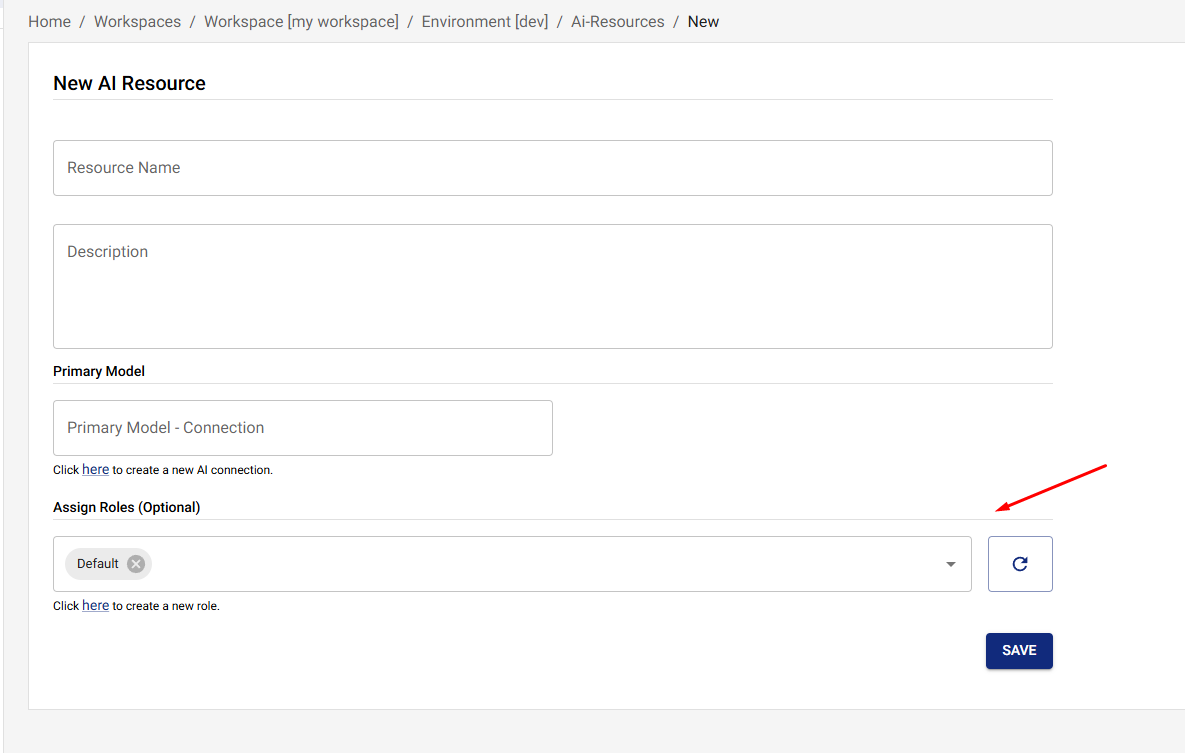
Only requests with assigned API keys can access the resource. If no API keys are assigned, all API keys can access the resource.
Updating an AI Resource
- Navigate to the resource
- Click Edit
- Update the desired fields
- Click Save
Best Practices
1. Start Simple
Begin with:
- A single primary model
- No routing (or simple routing)
- At least one fallback model
Add complexity as needed.
2. Test Routing Conditions
Before deploying:
- Test routing conditions with sample requests
- Verify routing logic works as expected
- Monitor routing decisions in audit logs
3. Configure Fallback Chains
Always have:
- At least one fallback model for critical resources
- Fallback models from different providers
- Fallback models with different cost profiles
4. Set Resource Capacity
Use resource-level capacity to:
- Control costs per resource
- Ensure fair usage across resources
- Implement tiered access levels
5. Use API Keys for Access Control
Assign API keys to resources to:
- Control who can access which resources
- Implement multi-tenant access
- Track usage by API key
Troubleshooting
Routing Not Working
- Check Routing Enabled: Ensure routing is enabled
- Verify Conditions: Check routing conditions are correct
- Review Logs: Check audit logs for routing decisions
- Test Conditions: Test routing conditions with sample requests
Fallback Not Triggering
- Verify Fallback Models: Check that fallback models are configured on the Fallback tab and were saved.
- Review the audit log: Each failed leg emits a
fallbackaudit event with the failed model and upstream error. - Inspect response headers:
x-vmx-event-countandx-vmx-event-{i}-fallback-*show every leg the gateway tried. - Check Logs: Review the gateway logs for the failed leg's stack trace and the upstream provider's error message.
Capacity Limits Too Restrictive
- Review Capacity Configuration: Check if limits are too low
- Monitor Usage: Review actual usage patterns
- Adjust Limits: Increase capacity limits as needed
- Consider Prioritization: Use prioritization to allocate capacity fairly
Next Steps
- Dynamic Routing - Learn about dynamic routing rules
- Fallback - Configure automatic fallback
- Capacity - Set resource-level capacity limits
- AI Connections - Learn about AI Connections
- Prioritization - Understand capacity prioritization
- Usage - Monitor usage and metrics